

Four dials, your choice.
Keep sound, battery, network, storage or CPU in Overview. Add a GPU reading on supported hardware.
CoreWidgets for Mac
Four dials for your desk. A notch for your shortcuts. Two decks for the tracks you love.
Try the interactive demoSoon on the App Store with more and more features.
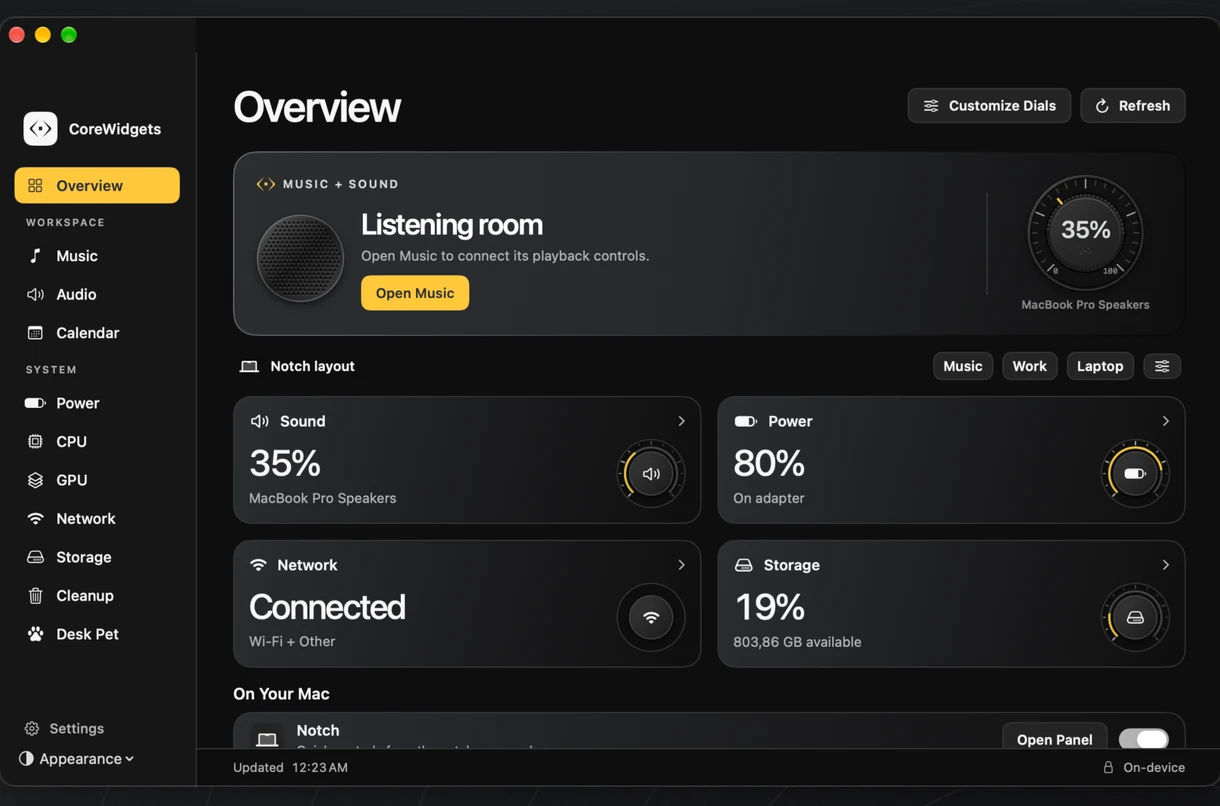
Demo data · Runs in your browser
 CoreWidgetsFileView
 Music + Sound
Click the notch or switch between Music, Work and Laptop.
Pick a widget and try its controls on the desktop above.
Enable JavaScript to try the Mac preview.
DJ Booth
Start the two original practice tracks and move the crossfader. In the Mac app, bring your own music and shape it with EQ, cue points and loops.
Desk Pet
Pick a companion and watch it walk along the Dock. In CoreWidgets you can also choose its size, change its route, or import your own pixel art.
Keep sound, battery, network, storage or CPU in Overview. Add a GPU reading on supported hardware.
Create your own layouts or switch between Music, Work and Laptop. Open your agenda, start a focus timer or change the audio output.
Place the animated Live Music player on your desktop. Add clocks and system widgets from the macOS gallery, or review a chosen cache folder in Cleanup.